How to Build an AI Content Repurposing Pipeline: From a Single Blog Post to 15 Social Media Assets
Learn how to build an AI-powered content repurposing workflow that transforms one blog post into 15 social media assets using n8n, AI, and automation. Follow the practical implementation to generate platform-specific content, validate outputs, and streamline your content distribution process.
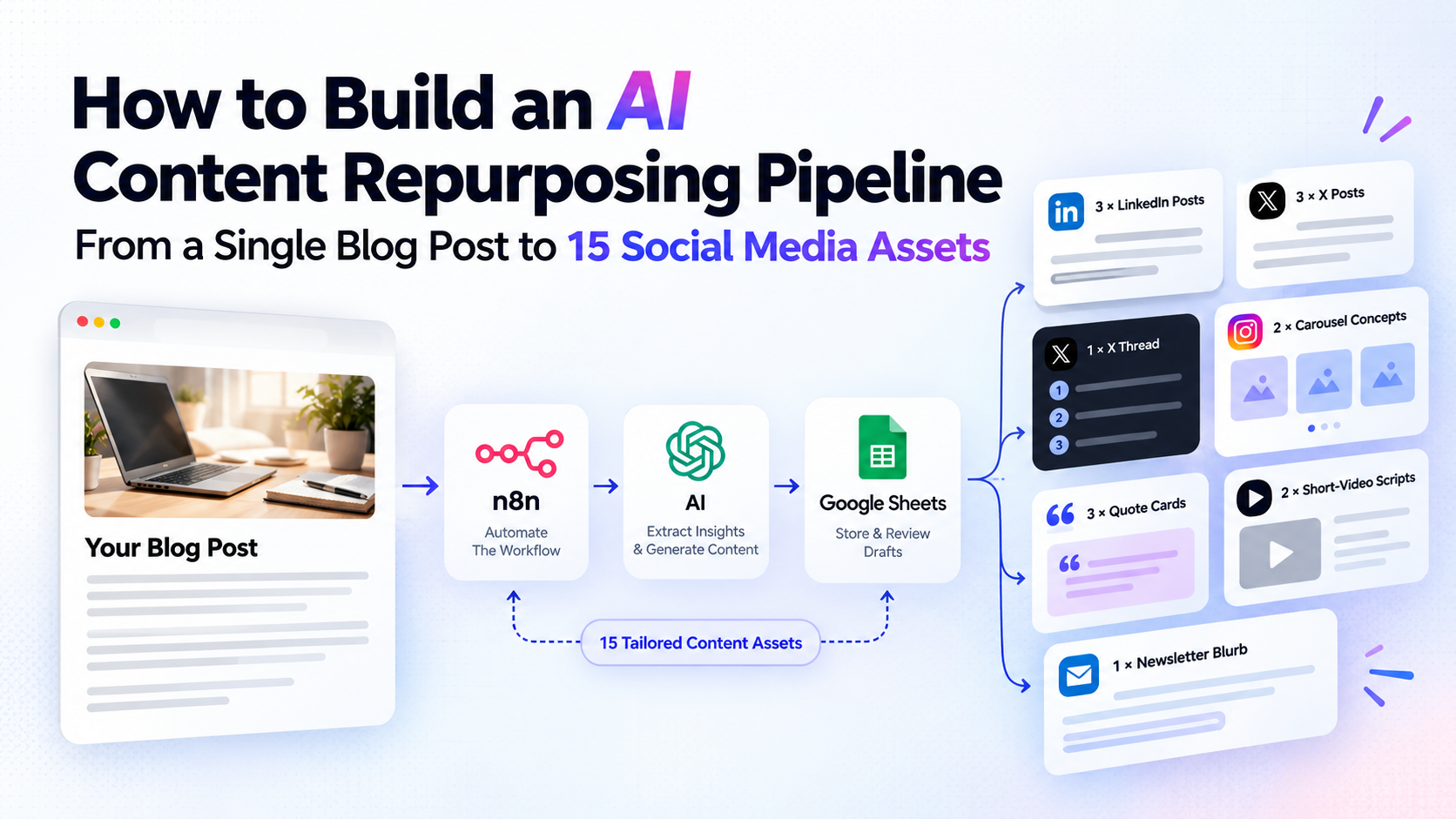
How to Build an AI Content Repurposing Pipeline: From a Single Blog Post to 15 Social Media Assets
Publishing a blog post is only half the work. You still need to turn its ideas into social media posts, short-video scripts, carousels, and other formats that reach your audience across different platforms.
Doing this manually takes time, especially when you publish regularly.
In this tutorial, we'll build an AI content repurposing workflow using n8n, an LLM API, and Google Sheets. The goal is to turn one existing blog post into 15 structured content drafts, validate the results, and prepare them for human review.
We'll cover the workflow architecture, implementation steps, validation, and common problems. You won't need to build a custom application or manually copy content between tools.
1. What Is an AI Content Repurposing Workflow?
An AI content repurposing workflow transforms an existing piece of content into multiple formats while preserving its original ideas and factual claims.
For example, a blog post about lead enrichment could become:
- LinkedIn posts highlighting different lessons.
- Short posts and a thread for X.
- Carousel outlines explaining a process.
- Quote-card concepts featuring important insights.
- Short-video scripts.
- A newsletter introduction.
The objective isn't to repeat the same paragraph in different formats. Each asset should communicate a useful idea in a format suited to its intended platform.
Automation makes this process repeatable. Instead of starting from scratch every time, you provide a source article and let the workflow handle extraction, generation, validation, and storage.
2. What We'll Build
Our pipeline will use three components:
- n8n: Connects the steps and manages the workflow.
- An LLM API: Extracts key insights and generates platform-specific content.
- Google Sheets: Stores the generated assets for review and editing.
The workflow follows this sequence:
Blog input → Extract insights → Generate assets → Validate output → Save drafts → Human review
We'll start with an existing blog post supplied as text. This keeps the first version simple and avoids problems caused by inaccessible URLs or inconsistent website HTML. URL extraction can be added as a separate step later.
The 15-asset output plan
| Content format | Number of assets |
|---|---|
| LinkedIn posts | 3 |
| X posts | 3 |
| X thread | 1 |
| Carousel concepts | 2 |
| Quote-card concepts | 3 |
| Short-video scripts | 2 |
| Newsletter blurb | 1 |
| Total | 15 |
These are draft assets, not 15 automatically published posts. Carousel and quote-card assets will initially contain text and creative directions rather than finished graphics.
3. Step 1: Prepare the Source Article
Create a new workflow in n8n and add a Manual Trigger node. This lets you test the pipeline before scheduling it.
Next, add an Edit Fields (Set) node with these fields:
{
  "source_title": "Your original blog title",
  "source_url": "https://example.com/your-blog",
  "article_text": "Paste the complete article text here.",
  "brand_voice": "Clear, practical, conversational",
  "target_audience": "Small business owners and marketers"
}
Replace the example values with your actual content.
For this first version, use a blog post that's long enough to contain several distinct ideas but short enough to fit comfortably within your chosen model's context limits.
Keep the source title and URL throughout the workflow. They'll help you trace each generated asset back to the original article.
4. Step 2: Extract the Key Insights
Before generating 15 assets, ask the model to identify the most useful ideas in the source article.
Add an LLM node to your workflow and provide the article text as input. Ask it to return a structured content brief.
Use this prompt as a starting point:
You are a content strategist.

Analyze the supplied blog post and extract:
1. Its central thesis.
2. Five to eight distinct insights.
3. Important facts, examples, and supporting evidence.
4. The target audience's problems.
5. Practical takeaways readers can apply.
6. Potential hooks for social media content.

Rules:
- Use only information supported by the source.
- Do not invent statistics, quotations, or case studies.
- Distinguish factual claims from recommendations.
- Preserve important qualifications and context.
- Return valid JSON using the agreed output schema.

Source title:
{{ $json.source_title }}

Source article:
{{ $json.article_text }}
Configure the node to return structured JSON if your selected model integration supports it.
The result should be a reusable content brief rather than another rewritten version of the article.
This intermediate step helps the next generation stage focus on distinct ideas instead of repeatedly summarizing the same paragraphs.
5. Step 3: Generate the 15 Content Assets
Add a second LLM node. Pass it the content brief, source metadata, and brand voice.
Use a prompt like this:
You are a social media content strategist.

Using only the supplied content brief, generate
exactly 15 distinct content assets:

- 3 LinkedIn text posts
- 3 short X posts
- 1 X thread
- 2 carousel concepts
- 3 quote-card concepts
- 2 short-video scripts
- 1 newsletter blurb

Requirements:
- Give every asset a unique ID.
- Include platform, format, angle, and content.
- Give every asset a distinct purpose or hook.
- Adapt the writing to its intended platform.
- Avoid unsupported facts and invented quotations.
- Do not copy the same idea across multiple assets
  unless the angle and presentation differ meaningfully.
- Preserve the original article's key claims.
- Return exactly 15 assets in valid JSON.

For quote cards, use exact source wording or clearly
label any suggested paraphrase.
For carousel concepts, provide slide-by-slide text.
For video scripts, include a hook, main points,
and a closing call to action.

Return this structure:

{
  "assets": [
    {
      "id": "asset-01",
      "platform": "LinkedIn",
      "format": "text_post",
      "angle": "A distinct content angle",
      "content": "The complete draft"
    }
  ]
}
Replace the sample structure with the full schema or structured-output configuration supported by your LLM node.
The prompt specifies the output count, but a prompt alone cannot guarantee that the model will follow every requirement. We'll validate the response in the next step.
6. Step 4: Validate the Output
Add a Code node after the generation step. Configure it to run once for all incoming items.
Assuming the previous node returns the JSON object shown above in an output field, use this code:
const raw = $input.first().json.output;

const result =
  typeof raw === "string" ? JSON.parse(raw) : raw;

if (!result || !Array.isArray(result.assets)) {
  throw new Error("Invalid response: assets array missing.");
}

const assets = result.assets;

if (assets.length !== 15) {
  throw new Error(
    `Expected 15 assets, received ${assets.length}.`
  );
}

const ids = new Set();

for (const asset of assets) {
  if (
    !asset.id ||
    !asset.platform ||
    !asset.format ||
    !asset.content
  ) {
    throw new Error("An asset is missing required fields.");
  }

  if (ids.has(asset.id)) {
    throw new Error(`Duplicate asset ID: ${asset.id}`);
  }

  ids.add(asset.id);
}

return assets.map(asset => ({
  json: {
    ...asset,
    status: "Needs review"
  }
}));
Important: This code assumes that the model node exposes its response under output. Depending on the n8n node and model integration, the response may instead be under another field. Inspect the node's execution output and adjust the first line accordingly.
This validation catches missing fields, duplicate IDs, and incorrect asset counts. It doesn't prove that the content is factually accurate or genuinely distinct; those checks still require additional logic or human review.
For production use, add a recovery path for malformed JSON and incomplete generations instead of simply stopping the workflow.
7. Step 5: Save the Assets in Google Sheets
Connect a Google Sheets node after the Code node and configure it to append each incoming item as a row.
Create a spreadsheet with these columns:
| Column | Purpose |
|---|---|
| ID | Unique asset identifier |
| Platform | Intended platform |
| Format | Post, thread, carousel, etc. |
| Angle | Main idea or hook |
| Content | Generated draft |
| Status | Review and approval state |
Map the corresponding fields from the Code node into the spreadsheet columns.
Every generated asset should start with the status Needs review. Once you inspect and edit a draft, you can change the status to Approved.
For production workflows, also store the source URL, generation timestamp, and a stable run identifier. These fields help with traceability and prevent accidental duplicate rows when a workflow is retried.
At this point, the basic pipeline is assembled:
Manual Trigger → Edit Fields → LLM Content Brief → LLM Asset Generation → Code Validation → Google Sheets
You now have a repeatable way to generate and organize content drafts from a single blog post.
8. Test the Workflow Before Scaling
Run the workflow against one real article and verify the output manually.
Use these acceptance criteria:
- Exactly 15 assets are returned.
- Every asset has the required fields.
- All seven content-format counts match the original plan.
- No unsupported statistics or quotations appear.
- The assets contain meaningfully different angles.
- All drafts are saved with the correct review status.
- A failed or repeated run does not silently create duplicate records.
Also test what happens when the model returns malformed JSON, the API request fails, or the source article contains very little useful information.
Don't add automatic publishing until the draft-generation process is reliable.
9. Common Problems and How to Fix Them
The posts sound repetitive. Generate a content brief first, require distinct angles, and check for similar hooks before saving the assets.
The model invents facts. Restrict generation to source-supported information and review claims against the original article. Structured output improves consistency, but it does not guarantee accuracy.
The model returns fewer than 15 assets. Validate the count and retry with instructions to generate only the missing asset types. Avoid blindly regenerating everything.
The workflow creates duplicate rows. Use stable asset identifiers, check existing records before inserting, and make retry handling idempotent.
API costs become unpredictable. Track token usage, limit unnecessary retries, and test with one article before processing a large backlog.
10. Measure the Results
Generating 15 drafts is a useful starting point, but volume alone doesn't demonstrate business value.
Track the time required to prepare and edit each asset, the percentage approved without major revisions, publishing consistency, engagement, link clicks, and leads generated from the content.
Compare the automated workflow with your previous manual process. This will show whether the automation actually saves time while maintaining content quality.
Conclusion
An AI content repurposing pipeline turns content distribution into a repeatable process. With n8n, an LLM API, and Google Sheets, you can build a workflow that extracts insights, generates platform-specific drafts, validates their structure, and prepares them for human review.
Start with one article. Test the output, refine the prompts, and add publishing integrations only when the generation and review stages work reliably.
For businesses that publish regularly, the same architecture can be adapted to newsletters, product announcements, case studies, and other recurring content workflows.
The real opportunity isn't generating more content. It's building a reliable system that helps useful content reach more people without multiplying manual work.