How to Build an n8n Lead Enrichment Workflow: A Beginner-Friendly, Self-Hosted Guide
Learn how to build a basic self-hosted n8n lead enrichment workflow that accepts a company CSV, validates company data, detects duplicates, extracts website signals, assigns transparent lead scores, and exports the results to CSV. This hands-on guide walks through the workflow, explains the code behind each step, highlights common debugging challenges, and covers the limitations and best practices to consider when extending it for real-world use.
- 1.Automated Lead Enrichment Workflow: The Complete Guide
- 2.How to Build a No-Code Lead Enrichment Workflow
- 3.How to Build an n8n Lead Enrichment Workflow: A Beginner-Friendly, Self-Hosted Guide
- 4.Clay vs. n8n vs. Zapier vs. Make vs. Custom Code: Choosing the Right Lead Enrichment Stack in 2026
- 5.Why Your No-Code Lead Enrichment Is Blasting Your API Budget (And How to Fix It)
- 6.Your Workflow Says Success, But Your CRM Never Updated: How to Detect and Fix Silent Failures
- 7.The Silent Killer of Lead Enrichment: 9 Workflow Failures That Break Your CRM Data
How to Build an n8n Lead Enrichment Workflow: A Beginner-Friendly, Self-Hosted Guide
Building a lead list is easy. Turning that list into useful, structured company information is where the work begins.
If you run a startup, work at an agency, or build outbound sales workflows, you may already know the routine: collect company names, open their websites, inspect their business descriptions, organize the information, and prepare a spreadsheet for outreach.
Much of that work is repetitive. It is also a good candidate for automation.
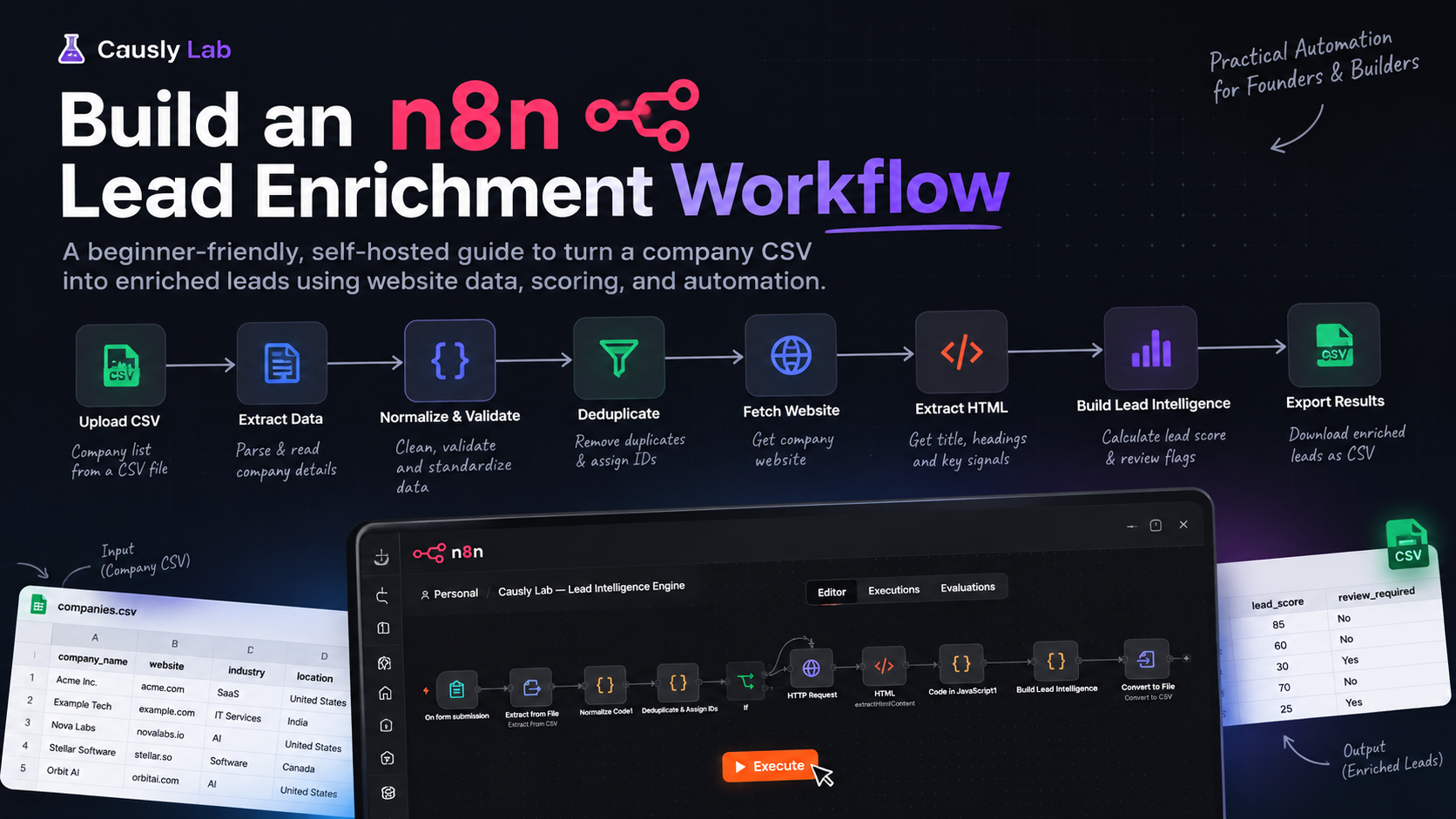
In this guide, we'll build a basic n8n lead enrichment workflow that accepts a CSV file, validates company records, detects duplicate domains, fetches company websites, extracts selected HTML signals, calculates a transparent score, and exports the results to CSV.
This is a practical, self-hosted implementation—not a fully autonomous AI research agent. We'll examine what the workflow actually does, how its nodes work together, the code behind important steps, the debugging challenges encountered during development, and what to improve before using it in a production environment.
What we'll build
The workflow accepts a CSV containing company information and produces a structured CSV containing the original records, website signals, a basic lead score, and review flags.
The input CSV uses four columns:
| Column | Purpose | Example |
|---|---|---|
company_name | Company name supplied by the user | Example Technologies |
website | Company website | https://example.com |
industry | Expected industry | IT Services |
location | Expected location | United States |
The output includes fields such as:
company_idcompany_namewebsitedomainwebsite_titlemeta_descriptionlead_scorescore_signalsidentity_statusreview_requiredresearch_statusenrichment_statusvalidation_statusduplicate
Some fields are populated from the input, while others come from website processing or scoring logic. The current implementation also includes review flags to help identify records that should not be treated as verified.
What this version does not do: it does not independently verify company identities, discover buying intent, or conduct comprehensive research across multiple website pages. Those are separate improvements we will discuss later.
Workflow architecture
The current workflow contains 12 nodes connected in the following sequence.
On Form Submission
        |
        v
Extract From File
        |
        v
Normalize & Validate
        |
        v
Deduplicate & Assign IDs
        |
        v
        IF
        |
        v
   HTTP Request
        |
        v
    HTML Extract
        |
        v
JavaScript Processing
        |
        v
Merge Research Results
        |
        v
Build Lead Intelligence
        |
        v
Prepare Final Records
        |
        v
Convert to File (CSV)
![▶️ Causly Lab — Lead Intelligence Engine - n8n[DEV] - Google Chrome 21-10-2026 12_09_05](https://xslhtflhmbuqwvbdchsd.supabase.co/storage/v1/object/public/media/ee602afc-1462-4050-83d1-310b080a076b.png)
The two intermediate JavaScript nodes process extracted website data before it reaches the research merge node.
The architecture separates the workflow into five logical stages:
- Input and parsing
- Validation and duplicate detection
- Website fetching and HTML extraction
- Lead scoring and review flags
- Final record preparation and CSV export
This separation makes the workflow easier to understand and troubleshoot than placing every operation inside one large code block.
Prerequisites
Before building the workflow, you'll need:
- A running n8n instance. This implementation was developed using a local, self-hosted instance on Windows.
- Basic familiarity with connecting nodes in n8n.
- A CSV file containing company names, websites, industries, and locations.
- A basic understanding of JavaScript for the Code nodes.
The workflow uses n8n's form, file-processing, HTTP Request, HTML extraction, Code, IF, and file-conversion nodes.
No paid enrichment API or external AI model is required for the current implementation.
For local development, start n8n using:
n8n start
Then open http://localhost:5678 in your browser.
Keep the terminal running while using the local instance. Your actual setup may differ if you deploy n8n on a remote server.
Step 1: Accept a CSV through an n8n form
The first node is On Form Submission.
It provides a form where a user uploads a company CSV. This removes the need to edit a hardcoded JavaScript array every time the input changes.
The form contains a file field labelled Upload Company CSV.
The next node, Extract From File, reads the uploaded file and converts its CSV rows into individual JSON items.
For example, a CSV containing three company records should produce three items for downstream processing.
A debugging lesson: binary field names matter
During development, the file extraction node initially failed because its configured binary property was data, while the uploaded file was stored under Upload_Company_CSV.
The fix was to configure the binary field to match the actual name returned by the form trigger.
This is a useful troubleshooting principle in n8n: when a node cannot find a file, inspect the upstream node's Binary output before changing the processing logic.
Do not assume that every file field is named data. Use the property name shown in your execution output.
Step 2: Normalize and validate company records
CSV files are not always consistent. Column names may contain spaces, website values may omit protocols, and some records may be missing required fields.
The Normalize Code1 node standardizes these values before the workflow attempts to fetch websites.
Its responsibilities include:
- Reading common variations of company-name and website column names.
- Adding
https://when a website has no HTTP protocol. - Extracting a normalized domain.
- Trimming industry and location values.
- Creating validation errors for missing company names or invalid-looking domains.
The following code reflects the current implementation:
return $input.all().map((item, index) => {
  const row = item.json || {};

  const getValue = (...keys) => {
    for (const key of keys) {
      const foundKey = Object.keys(row).find(
        k => k.trim().toLowerCase() === key.toLowerCase()
      );

      if (foundKey !== undefined && row[foundKey] != null) {
        const value = String(row[foundKey]).trim();
        if (value !== "") return value;
      }
    }
    return "";
  };

  const companyName = getValue(
    "company_name",
    "company name",
    "companyName",
    "company"
  );

  let website = getValue(
    "website",
    "company_website",
    "company website",
    "url",
    "domain"
  );

  if (website && !/^https?:\/\//i.test(website)) {
    website = `https://${website}`;
  }

  const domain = website
    .replace(/^https?:\/\//i, "")
    .split("/")[0]
    .split("?")[0]
    .split("#")[0]
    .split(":")[0]
    .replace(/^www\./i, "")
    .toLowerCase();

  const industry = getValue("industry", "company_industry");
  const location = getValue(
    "location",
    "company_location",
    "country"
  );

  const errors = [];

  if (!companyName) errors.push("missing_company_name");

  if (!domain || !domain.includes(".")) {
    errors.push("invalid_website");
  }

  return {
    json: {
      ...row,
      company_name: companyName,
      website,
      domain,
      industry,
      location,
      input_status: errors.length ? "invalid" : "valid",
      validation_errors: errors,
      input_row: index + 1
    }
  };
});
Understanding the validation result
A valid record receives:
{
  "company_name": "Example Technologies",
  "website": "https://example.com",
  "domain": "example.com",
  "input_status": "valid",
  "validation_errors": []
}
An invalid record receives an invalid status and an array explaining which required value is missing or malformed.
One limitation is important here: the current domain check is deliberately simple. Checking whether a string contains a dot does not prove that the domain exists, belongs to the supplied company, or is reachable. Production implementations should use more robust URL validation.
Step 3: Detect duplicate domains and assign IDs
The Deduplicate & Assign IDs node uses a JavaScript Set to track domains already encountered in the current input.
Each record receives a sequential identifier such as company_0001. A repeated domain is marked as a duplicate.
const seen = new Set();

return $input.all().map(item => {
  const row = item.json;
  const key = row.domain || "";

  const duplicate = key !== "" && seen.has(key);

  if (key && !duplicate) seen.add(key);

  return {
    json: {
      ...row,
      company_id: `company_${String(row.input_row).padStart(4, "0")}`,
      duplicate,
      research_status: duplicate
        ? "duplicate_skipped"
        : row.input_status === "valid"
          ? "queued"
          : "invalid_input"
    }
  };
});
The next node is an IF condition that checks whether research_status equals queued. Only records meeting that condition continue to website fetching.
This keeps invalid inputs and duplicate records from entering the normal research path.
Production consideration: this implementation detects duplicates within the current execution, not across separate uploads. It also treats different subdomains as different domains. If you need persistent deduplication, cross-upload matching, or more sophisticated domain canonicalization, add a database or another persistent storage layer.
Step 4: Fetch the company website
The HTTP Request node uses the normalized website URL to request the homepage.
This is the first point where external website behavior affects the workflow. Some sites respond quickly, while others redirect, block automated requests, return errors, or provide pages with little useful HTML.
A successful HTTP response does not automatically mean that the correct company was found. It only means that a response was obtained from the requested website.
For a production deployment, configure and test:
- Request timeouts.
- Retry behavior for temporary failures.
- Rate limits and concurrency.
- Redirect handling.
- Clear failure statuses for websites that cannot be fetched.
Also respect website terms, access restrictions, and applicable privacy requirements. Do not attempt to bypass access controls.
Step 5: Extract selected HTML signals
The HTML node extracts three types of information from the fetched page:
- The page title, using the
titleselector. - Main headings, using
h1, h2. - Links, using the
aselector and thehrefattribute.
These signals provide a lightweight starting point for understanding a company's website.
For example, a page title might describe the company or its product, while headings may reveal its services or areas of focus.
However, the current HTML node does not configure a meta-description selector. Although downstream code has a metaDescription field, that field may remain empty. It should not be presented as a reliably extracted feature until the selector is added and tested.
The workflow also extracts links but does not yet fetch and analyze the linked About, Services, or Contact pages. It is therefore a homepage-based extraction workflow, not a comprehensive website crawler.
Step 6: Process the extracted website data
Two JavaScript nodes sit between HTML extraction and Merge Research Results.
The first node collects fields such as page title, headings, and sample links. The second processes the available page fields and assigns a research status.
This is an area where the current implementation can be improved. The first node contains an earlier return statement that makes a second return block unreachable. The second node also returns only selected fields, meaning some information may be discarded before it reaches the merge node.
For maintainability, these intermediate nodes should be consolidated or rewritten so that they:
- Preserve the original company record.
- Preserve the extracted website fields.
- Return one consistent data structure.
- Track whether the page was fetched successfully.
- Keep the original source URL associated with the extracted information.
The Merge Research Results node combines company details with the extracted research fields. The workflow then passes the combined record to the scoring node.
The key engineering lesson is simple: in a multi-node workflow, data preservation is just as important as data extraction. A node may successfully fetch information but still cause problems if it drops fields required downstream.
Step 7: Calculate a transparent lead score
The Build Lead Intelligence node calculates a score using the available website signals.
The current scoring rules are:
| Signal | Points |
|---|---|
| Website domain is available | 20 |
| Page title is present | 15 |
| Meta description is present | 15 |
| Headings are present | 10 |
| Industry text appears in the extracted text | 15 |
| Location text appears in the extracted text | 10 |
| Business-related terms are found | 15 |
| Maximum possible score | 100 |
The node also records the reasons for the score in scoreSignals and stores matching business-related terms in detectedBusinessTerms.
For example, the output may contain:
{
  "leadScore": 35,
  "scoreSignals": [
    "Website domain available",
    "Website title found"
  ],
  "enrichmentStatus": "website_signals_only",
  "identityStatus": "needs_review",
  "reviewRequired": true
}
The example illustrates how the workflow explains its score rather than returning only a number.
What the score actually means
This score measures the presence of selected website signals. It is not a validated measure of company quality, purchase intent, or conversion probability.
A company can have an excellent website and no interest in buying your service. Another company may have a basic website and still be a strong prospect.
The score should therefore be treated as a preliminary data-completeness and relevance signal—not a final sales decision.
The identity check also remains conservative. If the page title does not contain the supplied company name, the workflow flags the record for review. A matching title can produce likely_match, but that is not independent identity verification.
For real sales qualification, a later version could add verified company descriptions, service categories, employee or location data from trusted sources, and scoring rules tailored to a defined ideal customer profile.
Step 8: Prepare and export the final CSV
The Prepare Final Records node selects the fields intended for the final report. It removes intermediate processing details and produces a consistent record structure.
The Convert to File node then converts the resulting items into a CSV file that can be downloaded.
The final file is designed to include the company details, website title, score, score reasons, review status, research status, enrichment status, validation status, and duplicate flag.
This is an important design choice: the output should remain understandable to someone who never opened the n8n editor.
Before using the workflow on a large dataset, test that:
- All expected columns are present.
- Invalid records are not silently lost.
- Duplicate and failed records have clear statuses.
- Empty values are distinguishable from verified negative results.
- The exported CSV opens correctly in your spreadsheet application.
One current limitation is that the normal research branch only processes queued records. Invalid inputs and duplicates are routed away from website fetching, and the current workflow does not explicitly combine all those records into a single final report. If complete accounting of every input row is required, add a separate reporting branch and merge the results before export.
Debugging lessons from the build
Building this workflow exposed several practical issues that are easy to overlook when looking at a finished automation diagram.
1. Match binary property names exactly
The CSV extraction node failed because its configured binary property did not match the uploaded form field name. Inspect the upstream Binary output before changing the extraction logic.
2. Preserve original company fields
HTTP Request and HTML extraction are not just about getting a page response. The workflow must retain the company name, website, domain, and other input fields so the extracted signals can be attached to the correct company.
Use n8n's item linking carefully and test the output after each transformation.
3. Validate the actual data, not just the node status
A node can execute without an error and still return incomplete or misleading data. Inspect representative output items and confirm that the values make sense.
For example, a company named “Example Technologies” paired with a website title belonging to a different organization should not be treated as verified.
4. Test realistic failure cases
A workflow that works for one accessible homepage is not necessarily reliable for many companies. Include tests for malformed URLs, missing names, duplicate domains, redirects, inaccessible sites, and websites with minimal HTML.
5. Keep intermediate data structures consistent
Define a predictable structure for the company record and the research result. Avoid unnecessary nodes that transform the same data repeatedly or silently discard fields.
These practices make the workflow easier to extend and reduce the time spent debugging later changes.
Best practices before using this workflow in production
The current workflow is a useful starting point. To make it dependable for real-world use, prioritize the following improvements.
Add evidence and source URLs
Store the URL from which each extracted claim came. This allows a person to inspect the source instead of relying on a score alone.
Improve identity verification
Do not rely solely on whether the page title contains the supplied company name. Use multiple signals and retain an explicit review status when the evidence is insufficient.
Fetch relevant pages selectively
The homepage often provides only a partial picture. A future version could discover and fetch relevant About, Services, Products, and Contact pages, with a strict page limit and same-domain checks.
Add retries and error handling
Distinguish temporary network failures from permanent errors. Retry only appropriate failures, use sensible timeouts, and avoid overwhelming websites with concurrent requests.
Keep scoring explainable
Store the individual signals and reasons behind each score. Test whether the scoring rules actually help identify companies that fit your intended audience before relying on them for sales decisions.
Preserve every input record
If the workflow skips invalid records or duplicates, retain those records in an error or review report. This makes it easier to reconcile the final output with the uploaded CSV.
Protect the workflow and its data
For deployment beyond local development, secure the n8n instance, restrict access to uploaded files and execution data, and avoid exposing internal endpoints unnecessarily. Treat uploaded CSV content and retrieved web pages as untrusted input.
What I'd improve next
The next iteration should focus on reliability and evidence rather than adding AI simply for the sake of it.
A practical roadmap would be:
- Fix the intermediate JavaScript nodes and ensure original records are preserved.
- Add meta-description extraction and verify the results.
- Add source URLs and stronger identity-review logic.
- Discover and fetch a limited number of relevant same-domain pages.
- Add explicit failure handling and a complete final report covering successful, invalid, duplicate, and failed records.
- Test the workflow on a representative dataset before describing it as production-ready.
An external enrichment provider or AI model could be added later if the use case requires deeper research. Neither is necessary to understand or improve the current workflow.
No-code vs. code: my experience
One lesson from this build is that a visual workflow is not automatically easier to maintain just because it requires less code.
n8n makes it possible to see the data flow and connect different operations without writing an entire application. That is useful for prototypes, integrations, and workflows that benefit from visual orchestration.
But as data transformations become more complicated, debugging field mappings, binary properties, item linking, and intermediate outputs can become frustrating. Small JavaScript functions can sometimes express those transformations more clearly and make them easier to test.
My preference is to use the right tool for the problem. A visual workflow can orchestrate the process, while code can handle the logic that benefits from explicit rules and predictable data structures.
The important question is not whether no-code or code is universally better. It is whether the implementation remains understandable, testable, and maintainable as the requirements grow.
Frequently asked questions
Can I build an n8n lead enrichment workflow without paid APIs?
Yes. This implementation uses website fetching and HTML extraction, so it does not require a paid enrichment API or an external AI model. The depth and reliability of the data depend on the websites being accessible and containing useful information.
Does this workflow verify that a company is legitimate?
No. It extracts website signals and applies a basic title-based identity check. A successful request or matching title is not proof that the supplied company and website belong together.
Is the lead score a buying-intent score?
No. The current score is based on the presence of website signals and selected text matches. It has not been validated as a measure of buying intent or sales conversion probability.
Does the workflow crawl the entire website?
No. The current version fetches the homepage, extracts selected HTML fields and collects links. It does not systematically fetch all relevant linked pages.
Can I use it with hundreds of companies?
The CSV input format can contain multiple records, but this version has not been established as production-ready for large datasets. Before scaling, add timeouts, retries, rate limiting, explicit failure reporting, and representative load testing.
Should I use n8n or write the workflow in code?
Use n8n when visual orchestration and integrations are valuable. Use code for transformations or business rules that are easier to test and maintain as functions. A hybrid approach can provide both visibility and control.
Conclusion
This n8n lead enrichment workflow demonstrates how to turn a company CSV into a structured output using validation, duplicate detection, website fetching, HTML extraction, transparent scoring, and CSV export.
It is a basic, working starting point—not a complete autonomous lead research platform. Its value is in showing the underlying mechanics and providing a foundation that can be improved through better evidence handling, stronger identity verification, more robust error management, and deeper website research.
Start small, inspect the data at every stage, and only add complexity when a real requirement justifies it. That approach produces workflows that are easier to debug, explain, and maintain.
The same principle applies to publishing technical content about the build: explain what was implemented, show the evidence, and be explicit about what remains to be done.